Getting official certificates in Karnataka, such as caste, income, residence, domicile, agriculture, pension, or disability certificates, has never been easier thanks to the Nadakacheri portal (AJSK – Atalji Janasnehi Kendra).
Gone are the days of standing in long queues or visiting multiple government offices. With Nadakacheri, citizens can apply, print, reprint, or verify certificates online quickly and securely, all from the comfort of their home.
This comprehensive Nadakacheri guide 2025 provides:
- Step-by-step instructions to print or reprint certificates online.
- Tips for verifying certificate authenticity using the RD number.
- Everything you need to know to efficiently use the Nadakacheri portal for caste, income, domicile, residence, and other Karnataka government certificates.
By following this guide, you can save time, avoid unnecessary trips to government offices, and ensure that your official documents are valid and verifiable online.
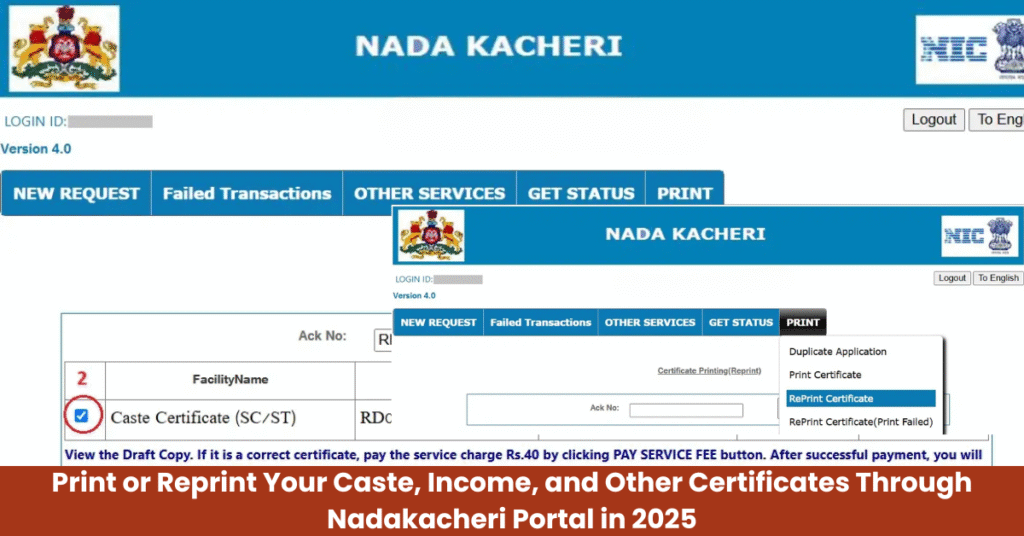
How to Print & Reprint Nadakacheri Certificate Online – Step-by-Step Guide 2025
The Nadakacheri portal (AJSK) allows Karnataka citizens to print or reprint official certificates online from the comfort of home. This includes caste, income, domicile, residence, agriculture, pension, and disability certificates.
Follow these easy step-by-step instructions to print or reprint your Nadakacheri certificate in 2025.
Steps to Print Your Nadakacheri Certificate Online
Step 1: Visit the Nadakacheri Portal
Open https://nadakacheri.karnataka.gov.in.
On the homepage, go to the “Apply Online” menu and select it.
Step 2: Log In to Your Account
- Enter your mobile number and click Get OTP.
- Input the OTP received and click Login.
Step 3: Select “Print Certificate”
- Under the Print menu, select Print Certificate.
- Enter your ACK Number (RD Number) and click Search.
Step 4: Download and Print
- If your certificate is approved and has not been printed before, the details will appear.
- Verify the information carefully, then click Print.
Note: Printing is allowed only once. Ensure your printer is connected, and pop-up blockers are disabled for a smooth process.
Steps to Reprint Your Nadakacheri Certificate
If you need a duplicate copy of a certificate already printed once, follow these steps:
Step 1: Log in to the Nadakacheri Portal
- Visit https://nadakacheri.karnataka.gov.in.
- Go to Apply Online and log in using your mobile number and OTP.
Step 2: Select “Reprint Certificate”
- Under the Print menu, click Reprint Certificate.
- Enter your ACK / RD Number and click Search.
Step 3: Verify and Preview
- Certificate details will appear.
- Tick the checkbox and click Draft View to preview your certificate.
Step 4: Make the Service Payment
- Accept the terms and conditions and select SBI e-Pay.
- Pay ₹40 via UPI QR Code or UPI ID using apps like PhonePe, Google Pay, or Paytm.
- Enter your UPI PIN to complete the payment.
Step 5: Print the Certificate
- After successful payment, the Print option will be enabled.
- If the print option does not appear, use “Reprint Certificate (Print Failed)” under the Print menu.
- Alternatively, visit your Taluk office to collect the certificate offline.
Why Print or Reprint via Nadakacheri Portal?
- Convenient & Online: Print or reprint anytime without visiting government offices.
- Secure Verification: Uses ACK / RD number verification to ensure authenticity.
- Multiple Certificates Covered: Includes caste, income, domicile, residence, agriculture, pension, and disability certificates.
- Affordable: Reprinting requires only a small nominal fee (₹40).
Who Can Print or Reprint Certificates Through Nadakacheri?
The Nadakacheri portal (AJSK) allows Karnataka citizens to print or reprint official certificates online securely. Only individuals who meet the following criteria can use this service:
- Approved Applications
You must have a certificate application approved by the Revenue Department or relevant Karnataka government authorities. - Possession of ACK / RD Number
You need the Application Reference Number (ACK Number or RD Number) assigned during your certificate application. This number is essential for RD number verification to ensure authenticity. - Duplicate Certificate Requests
If you require a duplicate copy of a previously issued certificate, the Nadakacheri portal allows reprinting for verified documents.
By restricting printing and reprinting to approved applicants with valid ACK / RD numbers, the Nadakacheri CV system maintains security, transparency, and authenticity of all government-issued certificates.
Key Points to Remember While Using Nadakacheri
When using the Nadakacheri portal (AJSK) to apply, print, reprint, or verify certificates, keeping these points in mind will ensure a smooth experience:
- Keep Your RD / ACK Number Ready
Your Acknowledgment Number (ACK) or RD Number is essential for certificate verification and printing. Always have it handy before accessing the portal. - Update Mobile Number and Email
Ensure that your contact details are current in the portal to receive OTPs, notifications, and updates about your certificate applications. - Download and Save Digital Copies
Always download a PDF copy of your certificate and save it for future use, official submissions, or educational and employment purposes. - Handle Failed Print Attempts Properly
If your print fails, use the “Print Failed” option available in the portal or visit your nearest Taluk office to collect the certificate offline. - Legal Validity
Certificates issued through Nadakacheri are legally recognized for all government services, scholarships, admissions, and official submissions in Karnataka.
Why Nadakacheri Certificates Are Important
Nadakacheri certificates play a key role in multiple official and government-related processes in Karnataka:
- Government Scholarships and Education Benefits
Required for fee concessions, scholarships, and reservation benefits. - Job Applications and Employment Verification
Helps employers verify caste, income, domicile, or residence certificates submitted by applicants. - Government Schemes and Subsidies
Necessary for applying to welfare programs, pension schemes, and financial subsidies. - Proof of Identity, Residence, or Income
Officially accepted for banking, loans, property documents, and legal purposes.
By using Nadakacheri, citizens can save time, reduce paperwork, and avoid multiple visits to government offices, making it faster and easier to obtain caste, income, domicile, residence, agriculture, pension, and disability certificates.
FAQs About Printing and Reprinting Nadakacheri Certificates
Q: How can I print my Nadakacheri certificate online?
A: Visit the Nadakacheri portal, log in with your mobile number, enter your RD/ACK number, and use the Print option.
Q: Can I reprint a certificate already printed?
A: Yes, use the Reprint Certificate option on the portal and pay a small service fee to get a duplicate copy.
Q: What is the fee for reprinting Nadakacheri certificates?
A: The service fee for reprinting is ₹40, payable via SBI e-Pay or UPI.
Q: What if my certificate does not print online?
A: Use the “Reprint Certificate (Print Failed)” option or visit your Taluk office to collect it offline.
Q: Do I need an RD/ACK number to print certificates?
A: Yes, the Application Reference Number (RD/ACK) is required for both printing and reprinting certificates.
Q: Are Nadakacheri certificates valid for official use?
A: Yes, certificates issued through Nadakacheri are legally valid for government, education, and employment purposes.
Q: Can I access Nadakacheri certificates 24/7?
A: Yes, the portal is available online at all times for printing or reprinting certificates.
Q: Which certificates can I print via Nadakacheri?
A: You can print caste, income, residence, domicile, and other government-issued certificates.
Q: Do I need to visit a government office for the first print?
A: No, the first print can be done online unless technical issues require visiting the Taluk office.
Q: How do I verify my Nadakacheri certificate online?
A: You can verify certificates on the Nadakacheri portal using the RD/ACK number to confirm authenticity.